Dify · workflow
A social media research agent in Dify
Links in, a comparison out. The LinkDigest plugin reads each post — the transcript with times, the text in every image, key points with quotes checked against the post, and a receipt of what was read — and two LLM nodes do the summarising and comparing. It reads the links you give it; it does not search. $0.02 an image post, $0.02 per minute of video, 10 free on sign-up.
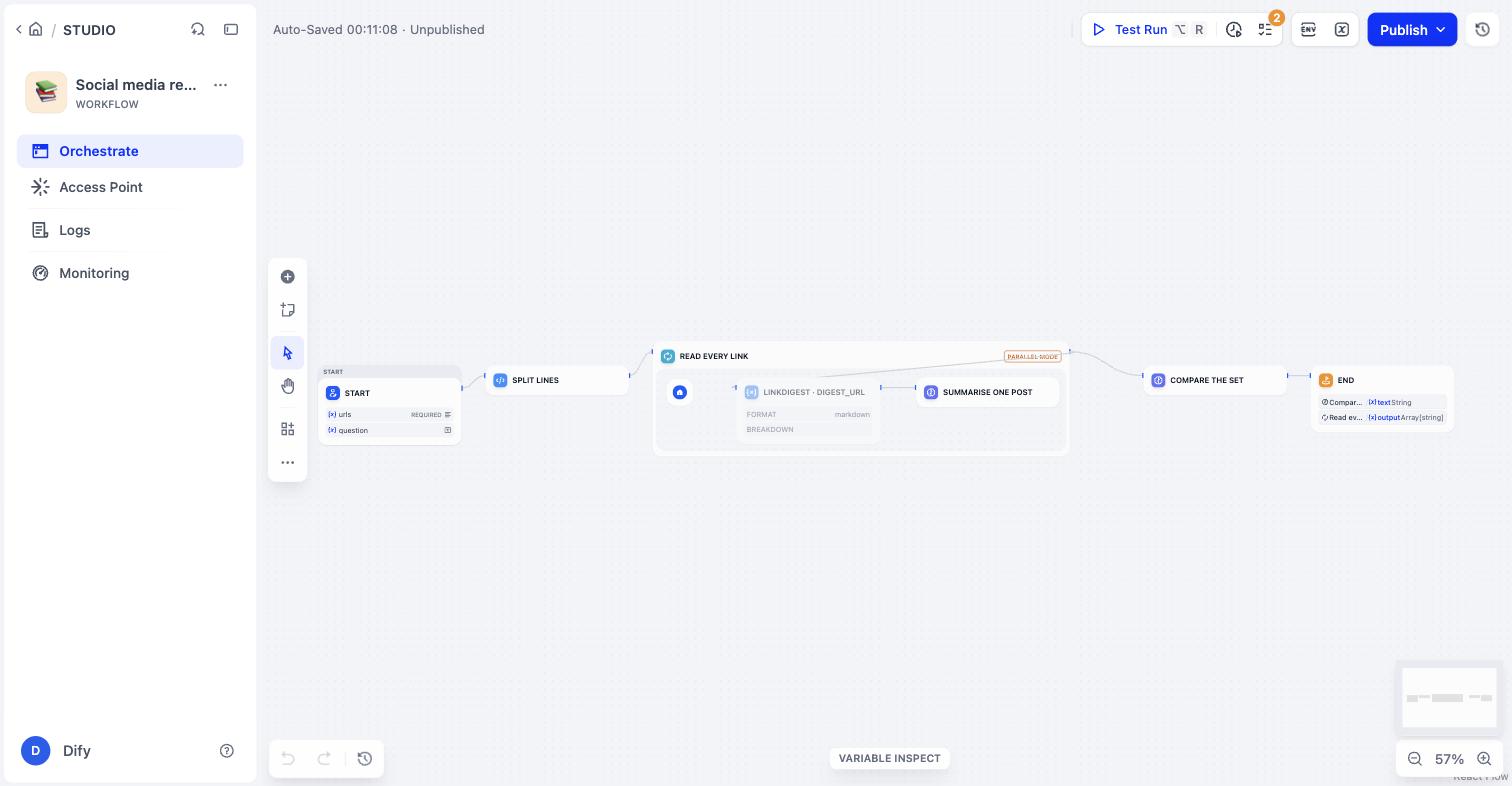
five steps
Install, import, run
1. Install the plugin
In Dify, open Plugins → Marketplace, search “LinkDigest”, install. Or open the marketplace page directly: https://marketplace.dify.ai/plugins/jcaiagent7143-ui/linkdigest.
2. Add your key
Plugins → LinkDigest → Authorize: paste an API key from linkdigest.dev/app/keys (sign in with Google or an email link). 10 free credits to start, no card.
3. Import the workflow
Studio → Create app → Import DSL file, and give it the file below. It creates a workflow with five nodes: Start (links, one per line; an optional question) → Split lines → Iteration over the links → LinkDigest digest_url → one LLM summary per post → one LLM comparison → End.
4. Pick a model
The two LLM nodes are left without a model on purpose, so the DSL imports on any workspace. Open each, choose the model you use, save.
5. Run it
Paste up to 20 links and, if you like, a question (“which of these recommends a product under ¥100?”). Each link costs what a read costs; a link anyone has read before is free. The iteration runs three links at a time and keeps going if one fails.
what each post comes back as
The tool’s output, which the summary node sees
# <title>
**Platform:** xiaohongshu · **Author:** …

## Key points
- …
  - ✓ “quote the server found in the post” (image 3)

## Transcript        (videos: with times)
## On-screen text    (videos: with ≈times; image notes: per image)
## Images            (image notes: each described, its text read)
## Coverage          (what was read, what was not — the receipt)
Set the tool’s format to json instead when a later node needs fields (key_points, key_point_support, transcript, images, coverage); the field reference is in the API docs.
honest limits
Before you build on it
- One link at a time, no search: collect the links first (a share sheet, a spreadsheet, another tool).
- Comments are not read; private, deleted or age-gated posts answer with a reason and cost nothing.
- Long videos take longer; the plugin waits for the read. How long a platform takes today is on /platforms, computed from the last 30 days.
- Prefer MCP or REST? The same server is on /connect and in the API docs; Coze imports the OpenAPI file.